12specialist connectors + Dynamic Bridge
Multiplenative technologies
9AI clients
1hub · policy
1licence across the stack
The hosts
Twelve AEC tools and services. One AI connection.
Ten desktop and file hosts plus two Autodesk cloud services, each driven through its native API — and the Dynamic Bridge, which works with Tekla Structures. Nothing is pre-programmed: your AI assistant reads the API of your own installation and writes the code as you ask, on your machine. The same hub, licence and policy.
New in 27.29: Unreal Engine joins the hosts, and in Archicad 29 and 30 your assistant now reads and draws in 2D views, in batches it can preview first.
 Revit
Design & document · 2024–2027
Revit
Design & document · 2024–2027
 Archicad
BIM & 2D drawing · 29–30
Archicad
BIM & 2D drawing · 29–30
 Vectorworks
Design across disciplines
Vectorworks
Design across disciplines
 Rhino
Rhino 8 · Grasshopper included
Rhino
Rhino 8 · Grasshopper included
 AutoCAD
Draft & detail
AutoCAD
Draft & detail
Dynamic Bridge
Works with Tekla Structures
 Blender
Visualize & present
Blender
Visualize & present
Unreal Engine
Real-time scenes · tested on 5.8
 SketchUp
Think in 3D, fast
SketchUp
Think in 3D, fast
 QGIS
Ground it in the real world
QGIS
Ground it in the real world
 openBIM
Coordinate & hand over
openBIM
Coordinate & hand over
 Autodesk Forma
Plan, design & analyse sites
Autodesk Construction Cloud / BIM 360
Manage & migrate cloud projects
Autodesk Forma
Plan, design & analyse sites
Autodesk Construction Cloud / BIM 360
Manage & migrate cloud projects
More on the way — the bridge architecture is uniform, so new hosts join the same AI surface with your prompts, skills and guardrails intact.
Tekla and Tekla Structures are trademarks of Trimble. Archi Automate is independent and is not affiliated with or endorsed by Trimble. Unreal and Unreal Engine are trademarks or registered trademarks of Epic Games, Inc. in the United States of America and elsewhere. Archi Automate is independent and is not affiliated with or endorsed by Epic Games.
The difference
Not a plugin.
An AI layer across your stack.
Most AEC automation is locked to one tool and one fixed command list. Archi Automate composes each operation on demand, in the host's own native technology — screened, previewed in dry-run where supported, and executed inside the host's own transaction model.
One assistant, twelve specialist connectors and the Dynamic Bridge: read from any, write to any, governed by one policy.
Composed on demand · screened · dry-run · audited
 Governed composition engine
plain language → native operation
Governed composition engine
plain language → native operation
twelve specialist connectors · desktop, file and cloud · plus the Dynamic Bridge
Interoperability
The highest-value work happens between the applications.
Twelve specialist connectors and the Dynamic Bridge around one AI core. The assistant queries every bridge, and creates, edits and coordinates according to each tool's capabilities and your active policy. Cross-tool work is explicit and AI-orchestrated — no background sync.
Revit
Archicad
Vectorworks
Rhino
AutoCAD
Dynamic Bridge
Blender
Unreal Engine
SketchUp
QGIS
openBIM
Autodesk Forma
Autodesk Construction Cloud / BIM 360
Archi Automate core
MCP · skills · guardrails · audit
Handoffs become explicit, reviewable instructions — no custom integration for every pair of tools.
Parametric concept → native production
Drive the active Grasshopper definition through the Rhino 8 bridge, review the result in Rhino, recreate approved elements natively in Revit, then carry the structural requirements into Tekla Structures through the Dynamic Bridge, for detailing. The handoff becomes a guided workflow — not a flattened export and a manual rebuild.Model QA → coordination → correction
Federate the discipline IFC models, run an IDS validation, open a BCF issue with a snapshot for each failure — then return a precise correction list to each authoring team. Automated checking becomes team action — not another PDF report.Tekla and Tekla Structures are trademarks of Trimble. Archi Automate is independent and is not affiliated with or endorsed by Trimble.
The openBIM backbone
Open or federate. Validate. Coordinate. Hand over.
A vendor-neutral QA and coordination layer that works on IFC directly — the whole loop from check to team action, without opening a CAD application.
Author & federate IFC
Open, author and federate IFC models from any authoring tool — no CAD application required.
Validate with IDS
Check models against IDS specifications — and author the specifications themselves from plain language.
Clash & quantities
Detect clashes across disciplines and take off quantities directly from the federated model.
Carbon estimates
Produce embodied-carbon estimates from model quantities — honest numbers for early decisions.
BCF issues, with pictures
Turn validation failures into a BCF issue set with referenced elements and snapshots — in one call.
Handover exports
Export COBie, glTF and USDZ for handover, viewing and AR — from the same conversation.
AI image rendering · new in 27.26
From the model you are working in to the image you present.
Point the assistant at a view — or at a render, or a site photograph — and get a photographic visualisation back in seconds. Then keep editing it in the same conversation: materials, light, season, context, one change at a time. Four image providers, your own accounts, and a provenance record for every image.

Render what you have open
No export, no scene rebuild. The view in the built-in viewer — from Revit, Rhino, Archicad, IFC or any other host — becomes the input, and the assistant restyles it while keeping the composition.
Render this view as a photograph: vertical larch cladding, overcast Nordic light, wet paving, no people.
Change one thing, keep the rest
Editing sessions carry on from the previous result, so each instruction changes only what you asked. For a hard boundary the assistant makes a mask from a text target and repaints inside it, pixel-exact outside.
Give the building on the left the facade of image 2, lights on inside. Then remove the car.
Geometry stays yours
The viewer hands the model's own depth and line passes to geometry-controlled models, so massing, openings and the camera stay where the model puts them while materials and context change.
Same camera, same volumes — now in brick, at golden hour, with the site trees.
The best model for each job
GPT Image 2.5 for precise edits and legible signage, FLUX.2 for photographic materials and structured briefs, fal.ai for geometry control, masks and print upscaling, Gemini for multi-reference edits. New models are usable the day a provider ships them.
Which model should render the signage? — and the assistant picks, with the price.
Your accounts. Your data.
Keys go into the Hub once, encrypted on your machine, and are never shown to the AI assistant. You pay each provider directly, per image, with no mark-up. A confidential-projects switch refuses any provider whose terms allow training on your images.
A cent to twenty cents per image; about forty cents for 4K at the highest quality.
Every image accounted for
The assistant quotes before it spends. Each image is saved with a provenance record — model, request, seed, metered cost, content credentials — and can be upscaled to print size in the same conversation.
Upscale the approved view to A1 at 300 dpi.
What you can do
Query, convert, validate, contextualize, render.
The same AI surface that answers a one-line question moves data between tools and runs a project-wide workflow — each operation inside the host's own transaction model.
Query any model in plain language
Ask a live model in any host — categories, parameters, geometry, relationships — without schedules or scripts.
Which blocks on this AutoCAD sheet sit on the wrong layer?
Convert between tools
Translate geometry and data across hosts with intent preserved — not a lossy dump. The AI maps source to target through each native API.
Rebuild this SketchUp massing as a Revit mass with matching levels.
Validate across disciplines
Run compliance, naming, and integrity checks — and cross-check one model against another for consistency.
Run an IDS check on the IFC and open a BCF issue for each failure.
Pull real-world context
Bring site, terrain, and neighbour data from GIS into the model so early decisions sit in the real world.
Pull the terrain and adjacent buildings around this site from QGIS.
Automate multi-step workflows
Describe logic spanning categories, conditions, and several hosts. Archi Automate composes the operations and runs them in order.
Adjust the Grasshopper definition in Rhino, then rebuild the approved geometry in Revit.
Render and present
Drive the visualization host — scene, materials, sun, cameras — or send the view straight to an AI image model, and produce presentation imagery through the same governed layer.
Render the west facade as a photograph in morning light, then swap the cladding to larch.
Why Archi Automate
The idea, in one short film.
Two minutes on why one AI layer across your whole AEC stack changes the work — and what it looks like in practice.
Multi-modal inputs
Anything the AI client can understand can inform the workflow.
Voice, images, drawings, spreadsheets, regulation PDFs, external APIs — whatever your AI client can read, Archi Automate can ground in the live model of any connected host.
Voice
Speak the operation.
Voice input through compatible AI clients turns spoken instructions into native operations — hands free, mid-meeting, in any connected host.
“Show every column in Rhino that clashes with a Revit beam.”
Images
Drop in a reference.
Hand the AI a site photo, a sketch, or a precedent image. It reads the visual, grounds it in the model, and composes the next step.
“Match the window rhythm in this facade photo on the south elevation.”
2D drawings
Read consultants' PDFs.
Feed in 2D PDFs, DWG snapshots, or annotated markups. The AI extracts intent and maps it onto the live model in any host.
“Tag every door on this consultant's fire-strategy markup.”
External data
Bridge any source.
Excel, GIS, manufacturer catalogues, energy-model results, building-code databases, your own APIs — wired in through the AI client.
“Pull the latest equipment-load table from the consultant SharePoint.”
How it works
Four hops from prompt to model — whichever host you point at.
The whole chain is inspectable. You can swap the AI client, pin the policy, and review the complete action history of any session.
01 · step
AI client
Your existing chat with Claude, GPT, or any MCP-compatible client. No new UI to learn.
Claude · GPT · MCP→02 · step
Model Context Protocol
Open MCP transport carries the request to the Archi Automate core. Standard, inspectable, swappable.
open protocol→03 · step
Archi Automate core
Selects the right bridge, composes the native API operation, and checks it against your active policy and skills.
policy · skills · dry-run→04 · step
Host execution
Executes through the native application, file or cloud API — whichever connector you point at, or the Dynamic Bridge — with rollback or undo where supported.
twelve connectors · Dynamic Bridge→Get started
Up and running in a minute.
Straight from the installer to your first prompt. Breadth grew, setup didn't — one install detects your hosts, one click connects your AI, and you're asking questions.
01Install onceOne installer detects the hosts on your machine.
02Connect your AI clientOne-click Claude, GPT, Gemini — or any MCP client.
03Run your first promptAsk a question in plain language — choose Read only in the Hub to start without changes.
Safety & governance
Read-only on every specialist connector. Preview where supported. Every change audited.
Connecting an AI to a model does not mean giving it permission. Archi Automate separates what the assistant can understand from what it may change — one policy, enforced across every connector and the Dynamic Bridge. The Dynamic Bridge has no read-only mode: its code runs only when changes are allowed, and an engineer checks the result.
Analysis without risk.
Inspect any element, parameter, or relationship in any host on a specialist connector. The bridge refuses any write operation, regardless of what the AI tries.
Query categories, parameters, geometry
No transactions opened
Safe for federated and review models
Preview before commit.
Where the host and operation support it, the AI runs the operation as a non-persistent preview — so the workflow can be checked before anything is kept.
Non-persistent preview run
Apply deliberately after review
Supported per host and operation
Full automation, audited.
Write operations execute host-natively, with rollback or undo where supported. Every step is logged, on every bridge.
Host-native execution
Rollback or undo where supported
Timeout and API constraints enforced
Screening & action history.
Every composed operation is screened against a configurable deny-list and your policy before execution. Every session writes a complete, reviewable action history.
Pattern-based deny-list
Element caps · delete blocking in Archicad, Forma, Grasshopper
Reviewable action history
Inside the app
A small console for a very large surface.
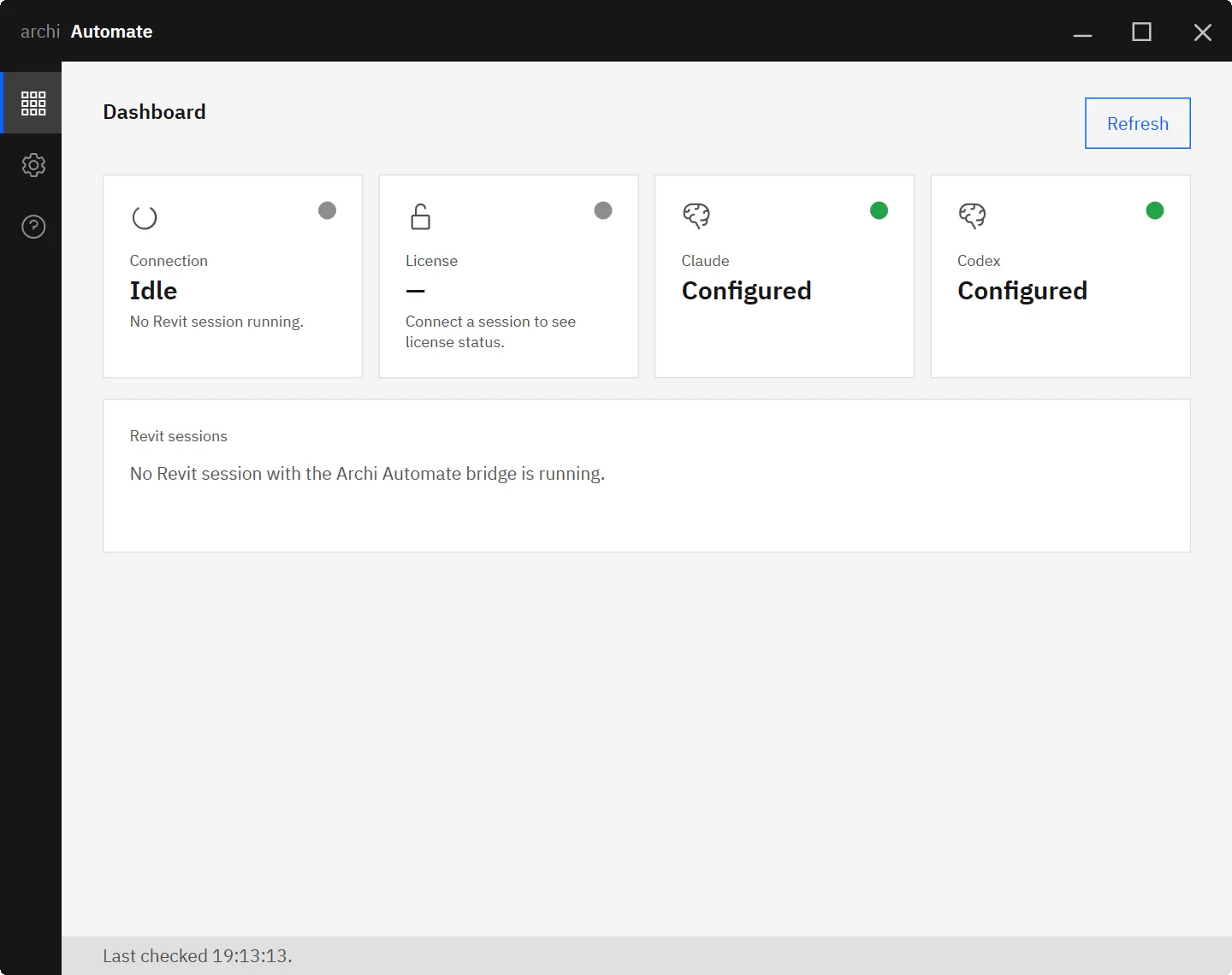
Archi Automate runs as a quiet desktop app beside your authoring tools. One install detects local hosts and connects the two Autodesk cloud services — a handful of screens cover the entire operator workflow across every connector and the Dynamic Bridge.
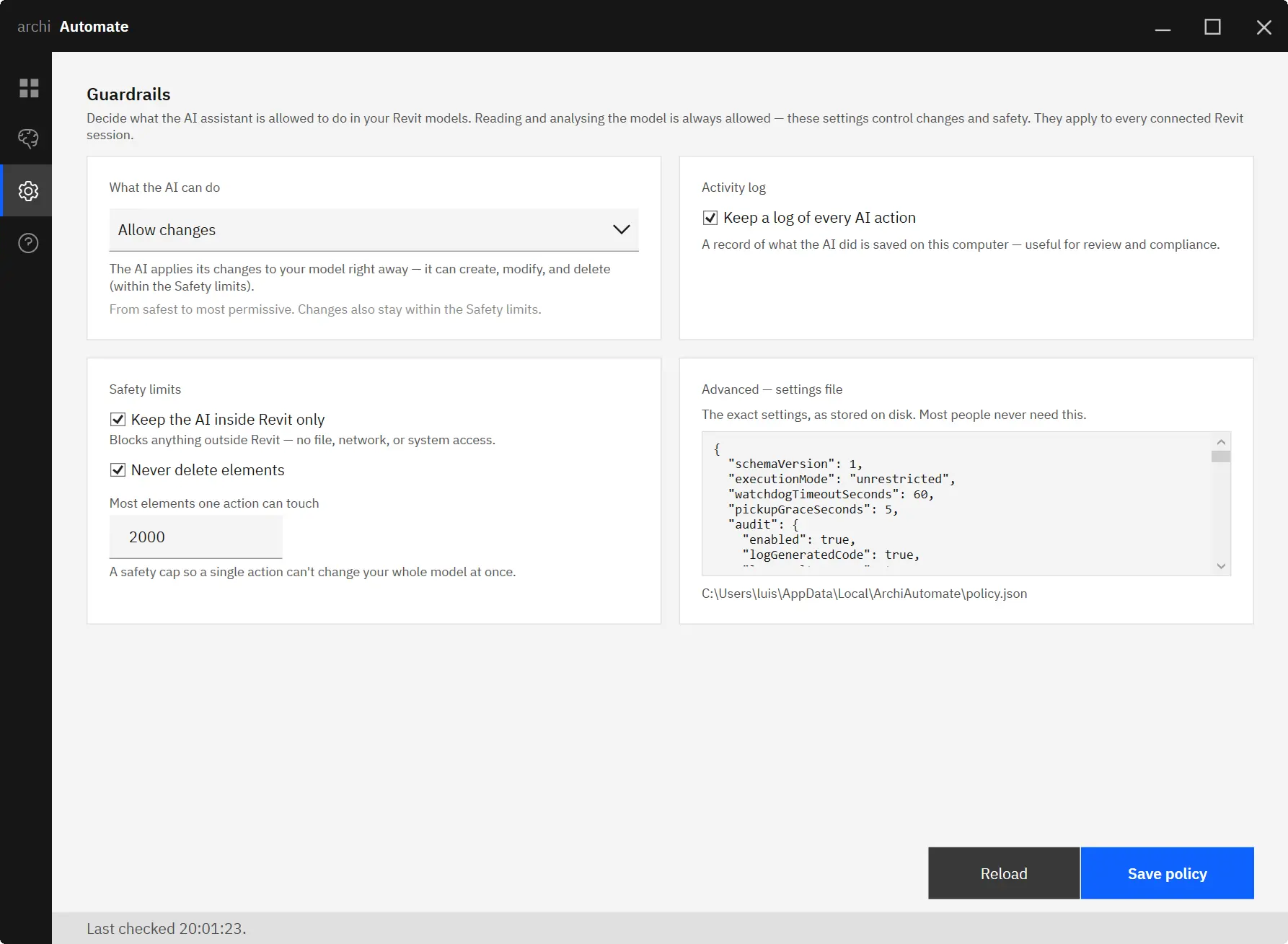
GuardrailsExecution mode, safety limits, activity log, and the raw policy file.
From pilot to practice
Start with one painful workflow. Expand from evidence.
Begin in read-only mode on a live project and find where better context saves time. Automate one bounded process — documentation, QA, parameter updates, coordination — with controlled changes only where the team is ready.
Then standardize: capture what worked as reusable skills, mappings and company rules. They apply across every bridge, and as the underlying AI models improve, the workflows you've built improve with them — no migration.
Book an AI workflow sessionOffice naming conventions
Ship your studio's number/letter conventions as a skill the AI applies in every host automatically.
studiopolicy
Template & layout libraries
Wrap your view templates, sheet layouts, and Archicad master layouts so the AI uses them, not generic defaults.
graphicstemplates
Building-typology rules
School, hospital, office, residential — encode the rules of thumb that govern each typology.
typologyrules
Regulation packs
TEK17, IBC, NBC, fire codes — distil regulations into checks the AI can run against any model.
compliancevalidate
Conversion mappings
Define how your studio maps geometry and data between tools — Rhino layers to Revit categories, and back.
convertinterop
Custom domain skills
Anything you can describe in a doc, you can package as a skill. The AI picks the right one for the task and host.
modularopen
Compatibility
Works with your assistant — and your whole stack.
Any MCP-capable AI client can drive Archi Automate, and every host bridge speaks its application's native API. Bring the assistant you already use.
 ClaudeMCP
 CodexMCP
 CursorMCP
 VS CodeMCP
 WindsurfMCP
 AntigravityMCP
 Gemini CLIMCP
 ClineMCP
JetBrainsMCP
Any MCP clientopen
Applications & cloud services
- Revit
Design & document · 2024–2027 - Archicad
BIM & 2D drawing · 29–30 - Vectorworks
Design across disciplines - Rhino
Rhino 8 · Grasshopper included - AutoCAD
Draft & detail - Dynamic Bridge
Works with Tekla Structures - Blender
Visualize & present - Unreal Engine
Real-time scenes · tested on 5.8 - SketchUp
Think in 3D, fast - QGIS
Ground it in the real world - openBIM
Coordinate & hand over - Autodesk Forma
Plan, design & analyse sites - Autodesk Construction Cloud / BIM 360
Manage & migrate cloud projects
Platform & protocol
- Model Context Protocol
open spec - Windows 10 / 11
x64 - One install detects & bridges all hosts
auto - Multiple host sessions at once
supported - One licence across every host
included - Floating & desktop licenses
both - Voice input via compatible clients
indirect
Versus
Where it fits next to what you already have.
Dynamo and macros stay excellent for known workflows inside one tool. Grasshopper remains the visual definition environment you know, while Archi Automate exposes dedicated grasshopper_* tools through the existing Rhino 8 bridge — the same Rhino card, session, licence and guardrails.
| Capability | Platform scripts | Single-tool AI plugin | Manual IFC exchange | Archi Automate |
|---|---|---|---|---|
| Plain-language input | ○ no | ◔ partial | ○ no | ● yes |
| Works across twelve AEC tools and services, plus the Dynamic Bridge | ○ no | ○ no | ◔ partial | ● yes |
| Read from one tool, write to another | ○ no | ○ no | ◔ partial | ● yes |
| AI composes in the host's native technology | ○ no | ○ no | ○ no | ● yes |
| No manual export / import round-trip | ● yes | ● yes | ○ no | ● yes |
| openBIM QA: IDS check → BCF issues | ○ no | ○ no | ◔ partial | ● yes |
| AI-driven rendering host | ○ no | ○ no | ○ no | ● yes |
| Preview before commit (where supported) | ○ no | ◔ partial | ○ no | ● yes |
| Audit trail of every session | ○ no | ○ no | ○ no | ● yes |
| One policy across every host | ○ no | ○ no | ○ no | ● yes |
Learn & support
Docs, community, and fleet deployment.
Get the most out of your Archi Automate subscription — step-by-step guides, an active forum, and silent-install tooling for IT.
Learn
Choose topics, find answers, get step-by-step instructions, and develop your skills with the full user guide.
User GuideDiscuss
The Archi Automate Forum is the place to ask questions, find answers, learn from experts, and share your knowledge.
Archi Automate ForumDeploy
Roll out Archi installers across multiple machines with the Silent Installer Guide, built for fleet deployment.
Silent Installer Guide
Included in Archi Collection
Get this plugin as part of the full Revit workflow bundle.
Archi Collection gives you Archi Automate plus the rest of archi's Revit workflow toolkit, expanding workflow coverage while offering better value than licensing plugins one by one.






Buy
Floating Licenses
Archi Automate
One assistant for
every model
in your project.
14-day full trial — all twelve specialist connectors, the Dynamic Bridge, governance and cross-tool workflows included. Start read-only, prove the value, and add automation at the pace your company can govern.