
One AI Across Revit, Rhino, Archicad and IFC

Short answer: Archi Automate gives you one AI conversation that reaches every running design host at once. Connect an AI client such as Claude, Cursor or VS Code, and the same chat can read from an open Autodesk® Revit® model, a Rhino® 8 scene, an Archicad® 29 project and a headless IFC file — carrying context between them — through the Model Context Protocol (MCP). There is no manual export shuffle and no hidden background sync: the AI agent does the bridging, one host and one document at a time.
If you work in AEC, your day is probably split across tools that do not talk to each other. Concept geometry lives in Rhino. Documentation lives in Revit or Archicad. Coordination and handover happen in openBIM — IFC, IDS and BCF. Each of these is excellent in isolation, and each is its own island. Moving an idea from one to the next means exporting, re-importing, re-naming, re-checking, and hoping nothing drifted in translation. The context you held in your head — which wall, which room, which level — has to be rebuilt by hand every time you switch programs.
That tool-switching tax is the problem Archi Automate is built to remove. Instead of one AI per application, you get one AI across multiple CAD tools, joined by a single connection.
One connection, every host
Archi Automate ships as a single Windows installer with a 14-day trial and no key required. Once installed, its hub exposes four things: Bridges (the connections to your hosts), LLMs (which AI clients you allow), Guardrails (what the AI may do), and Help. Any MCP client — Claude, Codex, Cursor, VS Code, Windsurf, Antigravity, Gemini CLI, Cline, or anything else that speaks MCP — attaches to that hub.
The result is that a single conversation sees all of your open sessions together. Run archi_list_sessions and you get one merged result listing every live session across every host, each row tagged with its host: revit, rhino, archicad or ifc. You do not query each application separately; the AI asks once and learns what is open everywhere.
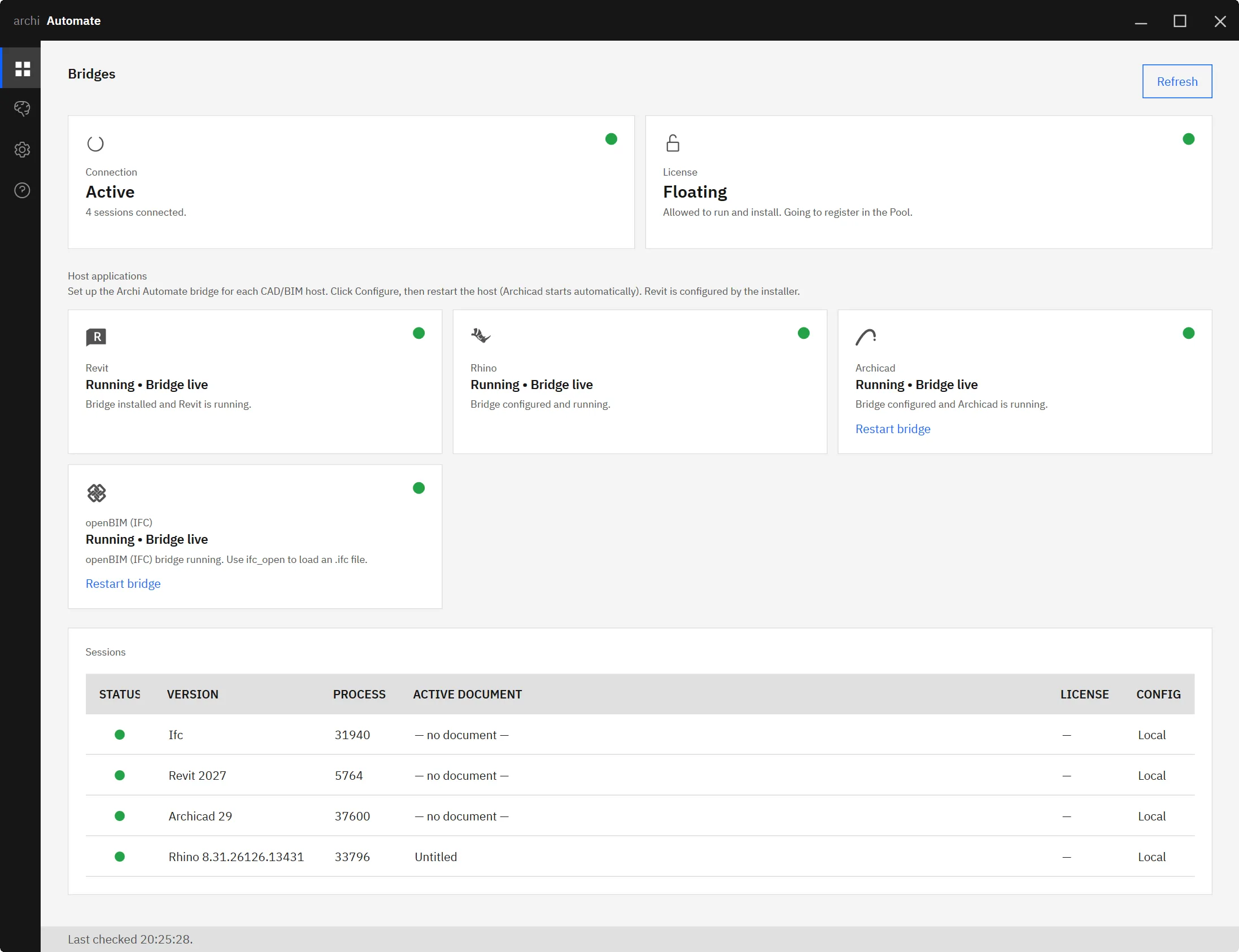
The tools themselves are namespaced so intent is never ambiguous: revit_* operations target Revit, rhino_* target Rhino, archicad_* target Archicad, and ifc_* target the openBIM connector. When you ask the AI to do something, it picks the right namespace for the right host without you having to switch windows.
Carry context between programs
Because one conversation reaches every host, you can carry context between programs inside a single chat. This is the part that changes how cross-tool work feels. A few concrete examples:
- Rhino → Archicad. Ask the AI to read a wall layout from an open Rhino model, then create matching walls in an Archicad project. The geometry you sketched in concept becomes a starting point for documentation, described once.
- Revit → IFC. Summarise a room schedule from a Revit model, then check the same rooms in an IFC export to confirm names, numbers and areas survived the round trip — a quick QA pass without leaving the chat.
- Revit → Rhino or Archicad. Inspect a pattern in a Revit model — a facade module, a column grid, a naming convention — and reproduce that pattern elsewhere, using the first model as the reference.
In each case the AI is the courier. It reads from one host, holds what it learned in the conversation, and writes to another. You describe the outcome; it sequences the steps.
How it differs per host
Under the hood, the four bridges are not identical, and it is worth being clear about how each behaves.
For Revit and Rhino, Archi Automate composes governed operations at runtime. Rather than a fixed menu of buttons, the AI assembles the operation it needs for the task in front of it, within the limits your guardrails allow. That gives broad reach across the model while keeping every action accountable.
For Archicad, the bridge is a first-party add-on with a curated command set. The AI works through a defined, supported set of commands designed for the Graphisoft platform — predictable and aligned with how Archicad expects to be driven.
For openBIM, the connector is headless. There is no application window to attach to; the AI reads and reasons over the IFC file directly. That is what makes the Revit-to-IFC QA pattern above possible — the export becomes something the same conversation can inspect on its own.
Honest about what it is — and is not
It is important to be precise here, because the experience can feel like magic and the wrong mental model leads to wrong expectations. The cross-host interoperability is orchestrated by the conversation, not by a background sync. The applications are not quietly streaming data to each other. Nothing changes in your Archicad project because you edited Rhino.
Every individual tool call still targets exactly one host and one document. When the AI “copies a wall layout from Rhino into Archicad,” it is really doing two scoped steps — read from the Rhino document, then create in the Archicad document — with the conversation carrying the meaning in between. The intelligence that joins your tools lives in the agent, not in a hidden pipe. That is a feature: you can see, in the chat, exactly what was read and what was written, and where.
Governance applies uniformly
One AI touching four hosts only works if you trust what it can do, so the same Guardrails apply everywhere. The default mode is Read only: the AI can inspect every host but change nothing. Preview lets you see proposed changes before they land. Allow changes permits writes when you are ready. Every action is audited, regardless of which host it targeted, so a cross-program workflow leaves one consistent trail rather than four disconnected ones.
Because guardrails are set at the hub, you do not configure permissions per application. The Rhino-to-Archicad workflow obeys the same rules as a single-host Revit query.
Go deeper per host
This article is the overview; each bridge has its own detailed guide if you want specifics:
- MCP for Revit — how the Revit bridge composes governed operations at runtime.
- MCP for Rhino — driving Rhino 8 geometry and data through the same conversation.
- MCP for Archicad — the first-party add-on and its curated command set.
- MCP for IFC & openBIM — the headless, vendor-neutral IFC connector.
- Revit-to-IFC QA pipeline — the cross-host QA pattern in detail.
- Connect Claude to AEC — setting up your first MCP client against the hub.
One installer, one conversation, every host. Stop exporting context out of your head and back into the next program. Start your free 14-day trial of Archi Automate — AI for AEC.











